The Nation's #1 Cookbook Publisher
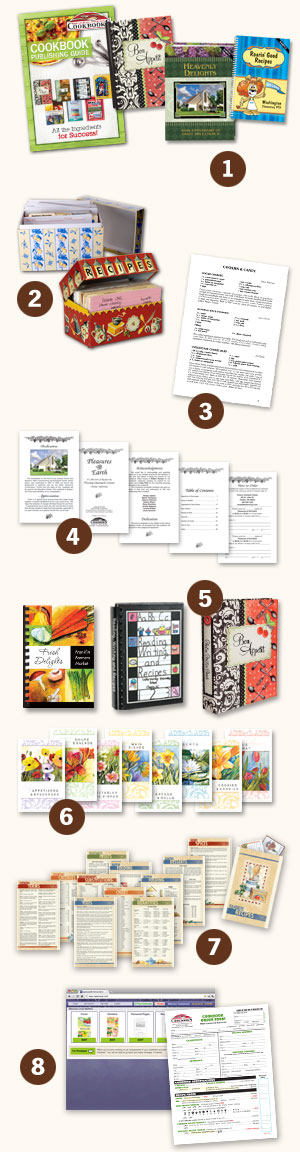
Make Your Own Cookbooks in 8 Easy Steps
Simply follow these 8 steps to learn how easy and enjoyable it is to self-publish your own cookbooks. You can ensure your coobkook is complete before submitting your order by using our Checklist to Prepare Order (PDF). For a quick overview of all 8 steps to create your cookbook, watch our video, Make Your Own Cookbook - 8 Easy Steps. Watch all our step-by-step videos for more details. Creating your own cookbook is easy as pie!
1 Get Started
 Step 1 Video
- Request a FREE Cookbook Kit for full details.
- Create a cookbook committee and delegate tasks to help prepare the different parts of your cookbook.
2 Collect & Submit Recipes
- Choose one of 3 ways to submit recipes: use typensave®, have us typeset them, or send press-ready pages.
- If you want to make your cookbook online and allow all contributors to enter their own recipes, use typensave®. Create a FREE account at www.typensave.com. You'll also save 25¢ per book ($300 maximum).
- If you want us to typeset your recipes, use our Recipe Collection Sheets (PDF) to gather recipes. Sort them into categories and subcategories. Use our Recipe Category Sheet (PDF) to assist you. Download all other Starter Material to help prepare your order.
- If sending press-ready pages, use our Press-Ready Cookbook Pages Guidelines (PDF).
- For accuracy and consistency in recipes, use our Helpful Tips and proof carefully.
3 Choose Format & Options
- Choose a recipe format. We offer 10 FREE recipe formats and 1 discount format.
- Choose from many recipe page options and select a paper color.
4 Develop Personal Pages
- Write content and provide photo(s) for your personal pages – you may use our Personal Page Sheet (PDF) to assist you. Choose personal page artwork.
- Title page and mail-order page content should be completed on the Order Form (PDF).
- If you are sending press-ready pages, provide ALL pages of your cookbook press-ready, including personal pages.
- If you use typensave®, upload photos and create all pages online.
5 Choose Cover Design
- Choose one of 3 cover styles: soft cover, hardback, or 3-Ring. Select cover options that may apply.
- Use one of our full-color stock covers or submit a custom cover.
6 Choose Divider Set
- Choose non-tabbed or tabbed dividers. If choosing non-tabbed, you may upgrade to heavier paper.
- Use a full-color stock divider set or submit custom dividers.
- If ordering custom dividers, determine what you want printed on the backs of your dividers.
7 Choose Extras
- Choose from our full-color Cooking Hints, Recipe Pocket Envelope, and advertising pages.
8 Place Your Order
- Decide how many books to order and submit your completed and signed Order Form (PDF), your recipes, and any required custom material. Make sure your order is complete and accurate. Late submissions and changes cause delays and extra charges.
- If using typensave®, complete the ordering process online.
- Indicate if you want RUSH Service; otherwise, we will use normal production time.
- Contact us if you have questions or need assistance.
- Upon receipt of your order, we will send a confirmation. You will have the opportunity to approve a proof before printing.

Why Publish A Cookbook
“Not only do you end up with a beautiful, lasting keepsake, [but]
you get to keep the profits.”
Steph - Morris Press Cookbooks


Copyright © 1997 - 2024 Morris Press Cookbooks®. All rights reserved. | Copyrights & Trademarks | Privacy | Site Map | Contact Us | 800-445-6621
