The Nation's #1 Cookbook Publisher
Writing & Sorting Recipes
Begin your cookbook project by requesting our FREE Cookbook Kit. The kit includes our Cookbook Publishing Guide, which provides complete details. Download our Starter Material for items you may need. For a quick review, watch our Step 1 video. You'll find everything you need to get started from the ground up.

Writing Tips
Review recipes for accuracy and make corrections as needed. See additional Recipe Writing Tips (PDF).
1. List ingredients in order used and make sure all ingredients are included in the directions.
2. Include all amounts and container sizes: 2 (8-oz.) cans, 1 (14-oz.) pkg. Use parentheses to separate amounts.
3. Abbreviate measurements in the ingredients list (see standard abbreviations), but spell them out in the directions.
4. Check for consistency of names, ingredients, etc., e.g., don’t use “1 c. butter” on some recipes and “2 sticks butter” on others.
5. Use ingredient names in the directions, e.g., use “Combine flour and sugar” rather than statements such as “Combine the first two ingredients.”
6. Include temperatures and all cooking, chilling, baking, or freezing times.
7. Make sure ingredients and directions are clear, thorough, and accurate. For example, don’t assume the reader knows how to make yeast bread.
8. Submit recipes exactly as you want them to appear.
9. Write recipe directions in one paragraph. Do not submit recipes in steps, columns, charts, or as an entire paragraph. Recipes which cannot conform to our format will be omitted.
10. Ingredients may include trademarked names, e.g., Miracle Whip. Do NOT use trademarked words for recipe titles. If used, they will be replaced with an acceptable alternative, e.g., Kentucky Derby® Pie will become Chocolate Nut Pie.
11. Anything other than the ingredients, directions, contributor name(s), serving size, and recipe title will be charged as a recipe note unless you omit them.
Contributor Information
- Be consistent with spellings of names, titles, etc. (R.N. vs. Registered Nurse or Bill Jones v.s. William Jones). This affects the index of contributors.
- Two extra lines may be included FREE (town, department, in memory of, title, etc.) with each contributor name. Additional content is considered a recipe note and incurs an extra charge.
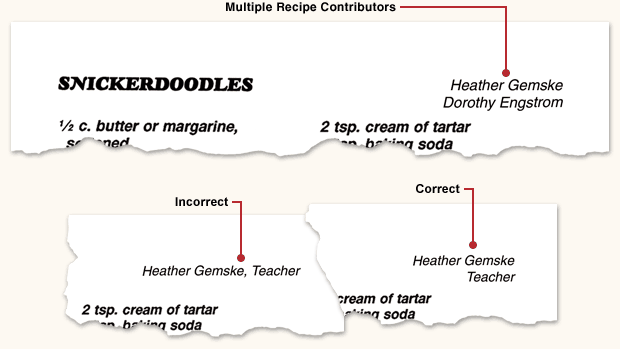
- If using typensave®, DO NOT include any additional information (second name, town, department, title, etc.) on the same line as the contributor name. Put additional info on separate lines. This enables us to create an accurate index of contributors. See example below.
- Duplicate recipes should be submited just once with multiple contributor names. Multiple contributor names are FREE. See example below.
- For recipes with multiple contributor names, only the first name will appear in an index of contributors.
Sorting into Categories & Subcategories
Once you receive all recipes and have checked them for errors, duplicates, consistency, etc., the task of sorting them begins.
- If you plan to use a full-color stock divider set, you must use our standard category titles.
- If you plan to use custom dividers, your own category titles can be used.
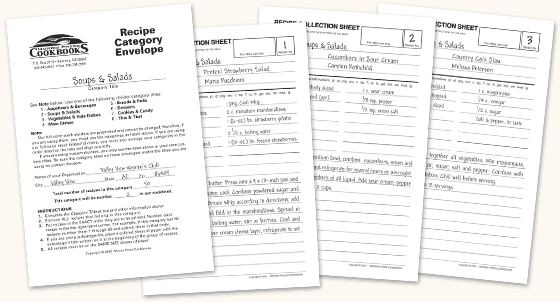
- Arrange recipes within each category in the exact order you want them to appear in your cookbook. Number each Recipe Collection Sheet (PDF) on the top right-hand corner. For example, if a category has 50 recipes, number recipes 1 through 50. Place them in a Recipe Category Envelope (furnished in your Starter Material) in the correct order (see below). If you don't have our envelopes, print our Recipe Category Sheets (PDF) and tape them to large manila envelopes.
- Complete the information on the front of each envelope (category title, number of recipes, and category number). If you further sort recipes into subcategories, follow the directions on Recipe Category Sheets (PDF).
- Send all recipes together. Late submissions cause production delays.
- If you use typensave®, recipes can be moved to the proper categories and subcategories as needed.
Recipe Collection Sheets
Our FREE Recipe Collection Sheets (PDF) make it easy to gather recipes in an organized, consistent fashion. If you use typensave®, these sheets are not necessary unless you need to assist members without Internet access. You may use your own forms, as long as they are of uniform size (sheets of various sizes are too difficult to keep in order).
Standard Abbreviations
If we typeset your recipes, we abbreviate measurements in the ingredients list and spell them out in the directions. If using typensave®, you may type recipes any way you want; however, for consistency, we suggest using standard abbreviations. We will not alter your recipes, so your committee should review and edit recipes before you submit them.
- c. –
- cup
- pkg. –
- package
- pt. –
- pint
- oz. –
- ounce
- tsp. –
- teaspoon
- gal. –
- gallon
- T. –
- tablespoon
- qt. –
- quart
- opt. –
- optional
- reg. –
- regular
- lb. –
- pound
- lg. –
- large
- doz. –
- dozen
- med. –
- medium
- env. –
- envelope
- sm. –
- small
- ctn. –
- carton or container
STANDARD ABBREVIATIONS
Non-Recipe Content
Pricing is based on recipe content (recipe title, ingredients, directions, serving size, and a contributor name). Non-recipe content, such as poems, stories, history, drawings, nutritional information, or charts, can only be included on personal pages, custom dividers, or as a recipe note within our 4 line limit (375 characters).
Non-Uniform Recipes
- Recipes submitted in steps, columns, charts, or paragraph form will be changed to fit your chosen recipe format.
- Recipes which cannot conform to your chosen recipe format will be omitted.
- If your recipes cannot conform to any of our formats, your cookbook pages can be submitted press-ready.
Checking for Errors
- Before you submit recipes, double-check the ingredients and directions for accuracy and consistency. Errors or changes can be costly to fix.
- If we typeset your recipes, our typesetters will try to correct misspelled words and obvious errors. Otherwise, we will typeset recipes exactly as they are submitted (within our recipe formats).
- If you use typensave®, you may print a proof at any time and make corrections as needed.
Editing a Proof
A FREE proof is furnished so you can correct any errors. This is NOT the time to edit pages. Editing consists of adding or deleting recipes, changing content, rewriting material, or any other changes made to your originally submitted material. Customer editing (change orders) can be very costly. Contact us if you have questions. See Change Order & Corrections Pricing (PDF).



Copyright © 1997 - 2024 Morris Press Cookbooks®. All rights reserved. | Copyrights & Trademarks | Privacy | Site Map | Contact Us | 800-445-6621
